Get your CAD up and running on your own, with easy setup and built-in guidance.
Dispatch, mobile MDT, records and Courts for small to midsize security and public safety teams. Set up at your own pace, starting at $25 per user per month.
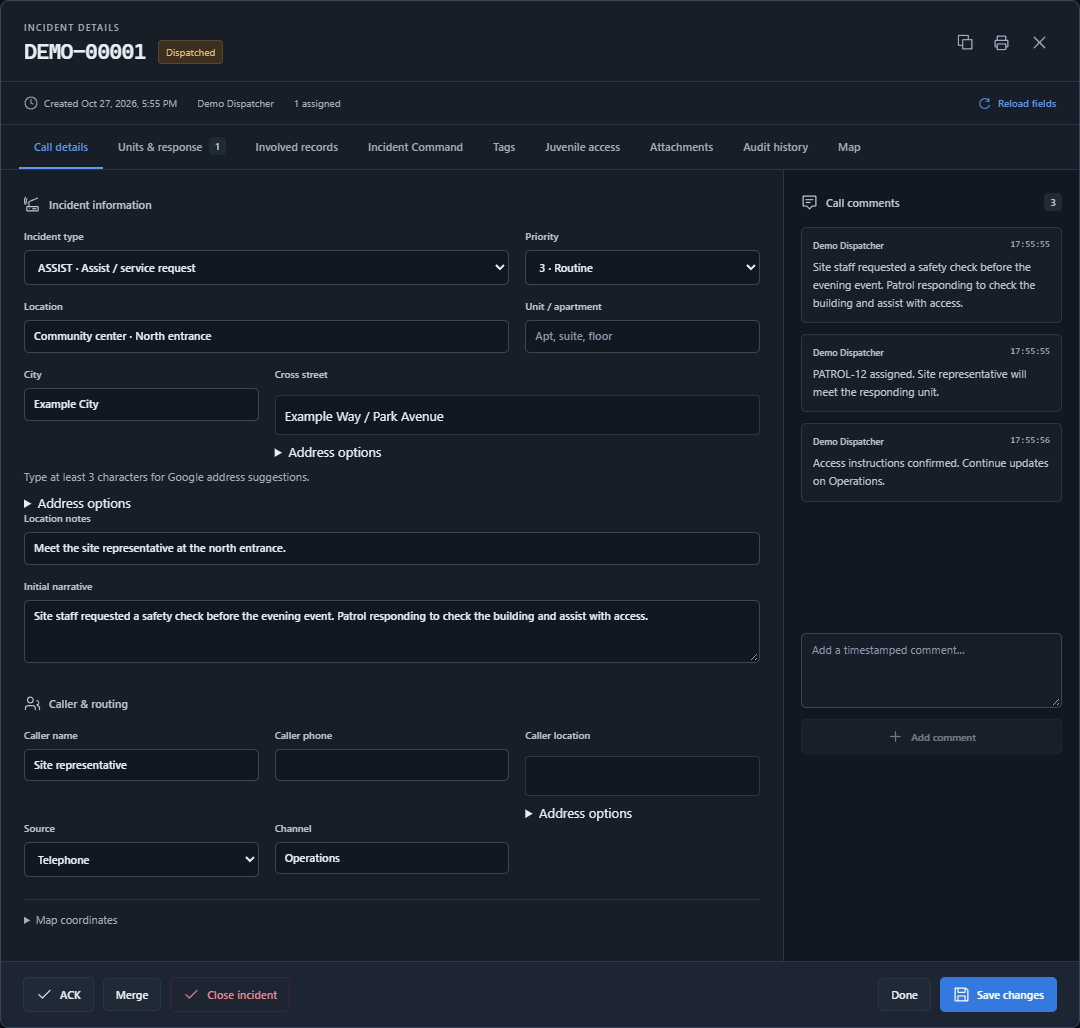
See the assignment, update your status and document the contact while you are still in the field. Move into the back office when it is time to finish the paperwork.
The right information, wherever the shift takes you.
Mobile MDT, GPS & emergency alerts
Keep field assignments and location sharing connected across your working screens.
Call details, unit status and your incident log
Browser location and supported USB GPS connections
Emergency alerts with location for authorized responders
E-Cite & field contacts
Create parking notices, trespass warnings and contact records using your agency’s configured forms.
Print a recipient copy or share an acknowledgment link
Time-limited QR links that can be replaced when needed
Record acknowledgment or refusal and provide a receipt
GPS requires device/browser support and permission. Email and text delivery require configured services. Your agency reviews the forms and requirements that apply to its work.
Bring related reports, involved records, assignments and media into an agency-isolated case workspace. Keep responsibility and progress clear from opening to closure.
Organize the longer story without replacing the original incident or approved report.
Case statuses, roles and assigned follow-up tasks
Connected reports and supplements with review history
Personal task queues, notifications and closure requirements
A media repository for the case
Keep photographs, video and documents with the case they support.
Resumable uploads that continue as you navigate the app
Agency-managed tags and grouped media selection
ZIP requests with file manifests, requester and download history
Uploads can continue while the application stays open. If the browser closes, return to resume; you may need to select the original files again. File limits, storage and processing depend on your agency’s configuration.
Start with the incident log, choose the report your agency needs and follow a clear writing and review process. Keep source records and approved history connected.
A dedicated back office for the work after the call.
NIBRS report writing
Work through report details with validation and a separate supervisor review.
Start a report from the incident log
Map local charges to NIBRS codes
Validate, submit, approve or return for corrections
Traffic-collision reports
Capture the collision in an agency-enabled reporting workspace.
People, vehicles and collision details
Diagrams and supporting attachments
Configured report profiles and printable output
RIPA stop reports
Use agency-enabled stop-report forms and an internal review workflow.
Configured reference values and code mappings
Selected validation checks and supervisor review
Print and internal archive export
NERIS preparation
Prepare fire-response information using the available reference catalogs.
NERIS entity and agency code configuration
Incident, tactic, location-use and aid classifications
Preparation checks and internal JSON export
NERIS is a preparation workspace, not full NERIS submission or validation. Reporting requirements and external submission workflows need agency review; these tools do not imply state or federal certification or automatic transmission.
From citation to court. Keep the record connected.
A dedicated workspace for the small municipal and limited-jurisdiction courts your agency supports. Bring authorized filings, case information, hearings and follow-up together.
Review once. Keep the source.
Review citation intake against the existing person record, with source references preserved in the court case.
The right workspace for court staff.
Clerks, judicial officers and finance staff receive their own court permissions and a dedicated sign-in. Your CAD administrator manages their accounts.
Local rules. Explicit authority.
Configure your court's approved rules and templates. Judicial approvals stay separate from routine account administration.
Your court determines its authorized case types, fees, rules and forms. Sample configuration requires local review. State, DMV and external warrant-system connections require separately authorized integrations.
08YOUR WORKSPACE. YOUR CONTROL.
Set it up yourself. Keep making it yours.
Start with the essentials and build at your own pace. Administrators can manage the everyday changes inside Quick CAD, with guidance beside the work.
Bring your existing operating information into a workspace you configure.
Saved onboarding progress and role-aware help
CSV templates, validation and a preview before import
Incident types, tags, numbering and module settings
Users, permissions & billing
Manage your team and subscription without a separate vendor request for routine changes.
Staff invitations, role permissions and optional admin MFA
Seat changes, invoices and verified card payments
Agency boundaries and configurable module access
Reviewed integrations
Enable approved partner connections using the credentials your agency provides.
Partner applications and guided API configuration
A test harness before administrative publication
Agency-enabled actions in incidents and the MDT
Photography and conceptual artwork illustrate the work; they do not imply customer endorsement or a compliance certification. Integration availability depends on partner configuration and administrative approval.
All selected seats are billed, including unused seats. Full payment is due when the trial ends. Unpaid operational access is suspended until successful full payment; Billing stays accessible. Contact support for other payment methods.
Easy self-service setup puts you in control. Follow the guided steps, save your progress and come back whenever you need. Built-in explanations and support help you make each setting work for your team.
01
Start with the essentials
Create your account, confirm your email and follow the setup steps. Save your progress and return when you are ready.
02
Make it your own
Configure agencies, incident types, units and roles at your pace. Choose the modules and seats your operation needs.
03
Learn as you go
Use guidance alongside your work. Bring in your team, assign access and explore with up to 25 active users during the trial.
HELP WHERE THE WORK HAPPENS
Integrated support. A useful next step.
Guidance belongs beside the task. Search role-aware quickstarts for dispatch, field work, records, cases and billing, consult court task guides and follow recovery steps when something needs attention.
See what is complete and what still needs review. Saved setup keeps the next step clear.
Searchable court task guides
Find help for filings, hearings, documents, payments and permissions inside the Courts workspace.
Practice, then move forward
Use the court walkthrough with synthetic examples. Follow status and recovery guidance when a task needs another look.
ABOUT QUICK CAD
Better tools for demanding work.
Quick CAD makes capable, affordable dispatch and field tools accessible to small to midsize security and public safety teams.
Safety work moves between a dispatch console, a vehicle and a desk. We bring those workflows together: take the call, coordinate the response, document what happened and prepare for the next shift.
Start with the modules your agency needs. Keep permissions, records and configuration under your control. Build a workspace that makes sense for your people.
Quick CAD offers a 30-day free CAD trial for up to 25 active users, with no credit card required to start. It is not a permanently free CAD system. After the trial, the early bird subscription is $25 per selected user per month, or $300 per user billed annually.
Can I set up Quick CAD myself, at my own pace?
Yes. The guided setup saves your progress to your account. You can pause, return and continue from where you left off. Start with the essentials, then configure the modules and permissions your team needs. Your 30-day trial begins when you complete initial setup and create your CAD workspace.
Where can I get guidance while using the application?
Setup explanations and checklists guide you through configuration. The application includes searchable, role-aware guides for dispatch, field work, records, cases, billing and administration. Courts also includes task guides, a practice walkthrough and recovery steps. You can consult these inside the application as you work, or contact support when you need more help. Court administrators must review local rules and templates before operational use.
Is this an affordable CAD for a small to midsize team?
Yes. Quick CAD is designed for small to midsize security, campus safety and public safety teams, including shared dispatch operations. Easy self-service setup, integrated guidance and per-user pricing help you get up and running with the capabilities your team needs. If you are comparing low-cost or cheap CAD software, use the trial to evaluate the workflow, permissions and operating costs.
Does Quick CAD include RMS and NIBRS reporting tools?
The back office includes incident logs, searchable records, a NIBRS report writer with validation and supervisor review, traffic-collision reporting, and property records. Agency settings and user permissions control access. Confirm your reporting requirements and submission workflow with the responsible authority before operational use.
How does the Courts module connect to CAD?
Courts connects authorized citation intake with person records, case files, hearings, documents and warrant workflows. A clerk reviews incoming filings; a citation does not become a conviction or warrant automatically. Court staff use a dedicated court sign-in page and permissions assigned by the CAD workspace administrator. Court-only users do not receive dispatch access.
Can our court use its own rules and forms?
Yes. Court setup supports local configuration and reviewed document templates. Your authorized court staff determine the case types, rules, fees and documents applicable to your jurisdiction. Sample settings are examples, not an approved statewide or nationwide legal profile. External court, state and warrant-system connections require their own authorized configuration.
Can one dispatch center serve multiple agencies?
Yes. A CAD workspace can serve one agency or multiple agencies. Dispatch can share selected calls with the agencies responding, while agency reports remain private. Administrators manage department types, users, roles and module access.
Can field users work from a phone, tablet or vehicle?
The browser-based mobile MDT supports field assignments, incident information, status updates and E-Cite. Location sharing can use browser / Windows Location Services or a supported USB GPS connection, with permission from the user. Device and browser compatibility apply.
What happens when the 30-day trial ends?
Full payment is due at the end of the trial. If payment is not received, CAD, MDT and other operational access is suspended for all users. Administrators retain access to Billing. Only a successful full payment restores operational access; reminders do not extend the trial.
How do seat pricing and renewals work?
Administrators, managers, dispatchers and field users all use paid seats. Every selected seat costs $25 per month at the early bird rate, against a $50 reference price. Annual billing is $300 per seat. All purchased seats are billed, including unused seats. Paid service renews on the first-payment anniversary. Credit cards are accepted; contact support about other payment methods.
How are maps and address searches configured?
Quick CAD uses Google Maps and Google address lookup. A platform Google Maps key can supply maps when available. Administrators can configure their own Google Maps browser API key in agency settings to override it. The associated Google Cloud project must have the required APIs and billing enabled. Google Maps usage charges are separate from the Quick CAD subscription.
How do I join my existing agency?
Ask your agency administrator for your team account, agency code and sign-in details. Choose Team member on the login page. Register a new account only if you are setting up a new CAD workspace.
READY WHEN YOU ARE
Your CAD. Set up your way.
Get up and running with easy self-service setup, integrated guidance and a monthly price that fits your team.